Permissions and groups
Access in ProtoCRM is decided by two things: the member's role in the organization, and the Groups they belong to. Groups are different from Plans, which decide which modules an organization has at all.
How access is decided
| Who | What they can do |
|---|---|
| Platform super admin | Everything, across organizations. |
| Organization owner or admin | Unrestricted inside their organization. Groups are ignored for them. |
| Member with Groups | The union of all their groups' permissions. More groups always means more access. There is no deny rule. |
| Member added by a super admin with no groups and no custom permissions | Not restricted: can use every module the organization has. |
| Member invited by email | Restricted to the permissions ticked in the invitation, unless Groups are assigned later. |
Department is only a label. It never changes what someone can access.
Where to find it
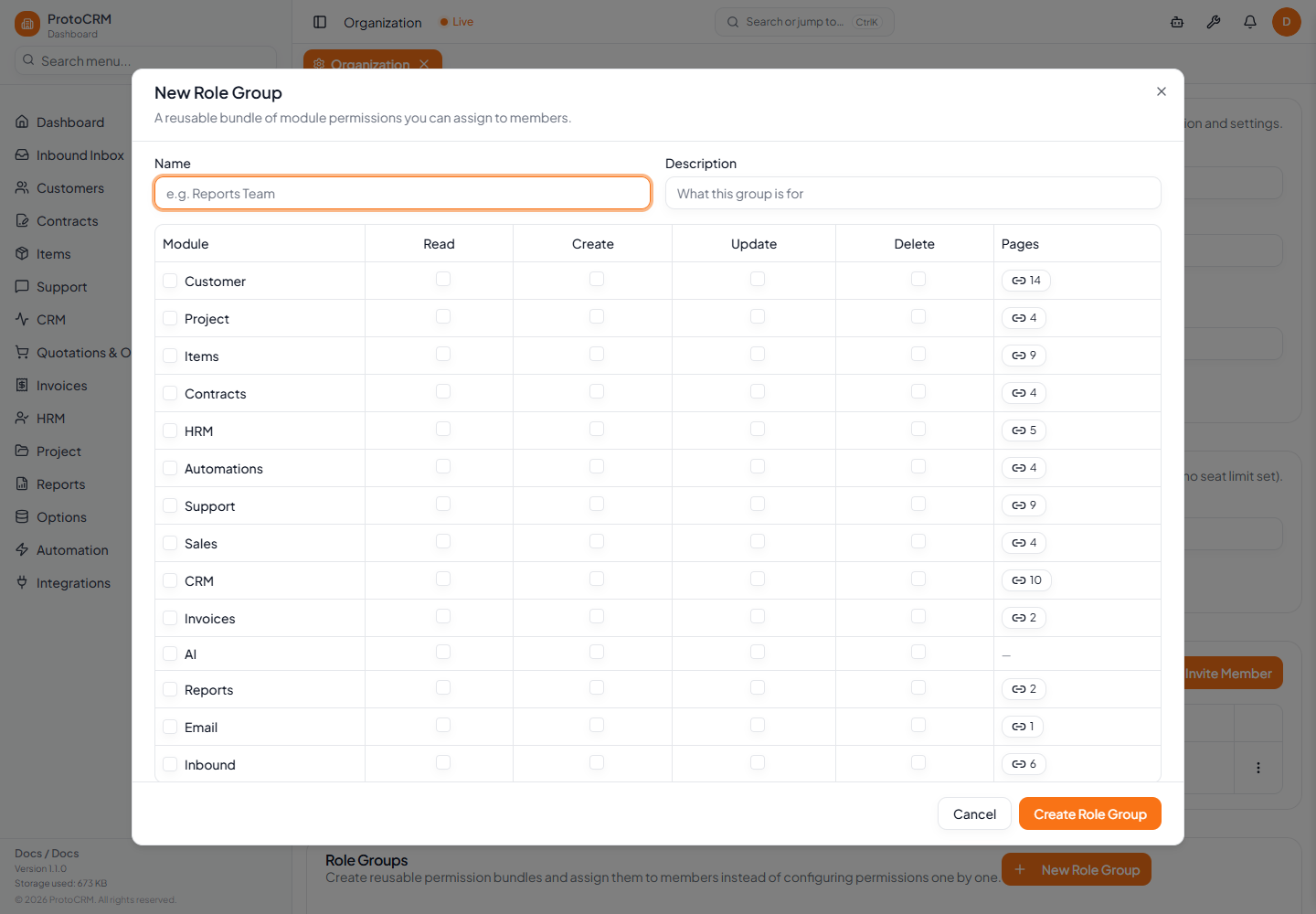
- Create and edit Groups: inside the organization, Organization page → card Groups → New Group. The dialog has Name, Description, a table of modules with create/read/update/delete rights, and allow-lists for Report Templates, Advanced Reports, Email Templates and Embedded Dashboards. The first three appear only when the Reports or Email module is enabled. Depending on the organization's translations the card and button may read Role Groups and New Role Group.
- Assign Groups to a member: a super admin uses organization → Members → row menu Quick edit access → Groups. An organization admin uses the Group column in Organization Members.
- Custom permissions on one member: the same panel, Custom permissions (added on top of groups).
Steps to give a team access
- Open the Groups card and click New Group.
- Enter a Name (for example Reports Team) and tick the modules and rights.
- Click Create Group. A message confirms Role group created.
- Assign the group to members.
Tips
- Only modules enabled for the organization can be granted. Enable modules first (Plans).
- Ticking any create, update or delete right also ticks read.
- In the member panel, the first custom permission you tick for a member with no restrictions keeps their current access to all built-in modules and restricts them to what stays ticked. Untick what they should lose.
- For allow-lists, if any of a member's groups is unrestricted for a resource kind, the member is unrestricted for it.
- The Translation module is never gated.
- Enforcement mode: the server setting
PERMISSION_ENFORCEMENTdefaults towarn, which logs a would-be denial but still allows the action, while menus are filtered already. Onlydenyblocks it. Ask your developer which mode your environment runs.